CodeKabir

On this page
A code audit answers a practical question: what state is this application in, and what should happen first? It is the step before a takeover, a major feature, an upgrade or an investment, and it is easy to do badly: skim a few files, run a scanner and hand over a list of opinions nobody can act on. This guide sets out the process step by step, with the commands to run on Laravel and Next.js projects, the checks no tool can make for you, and a checklist at the end. The code samples are illustrative patterns, not findings from anyone's application.
Quick answer
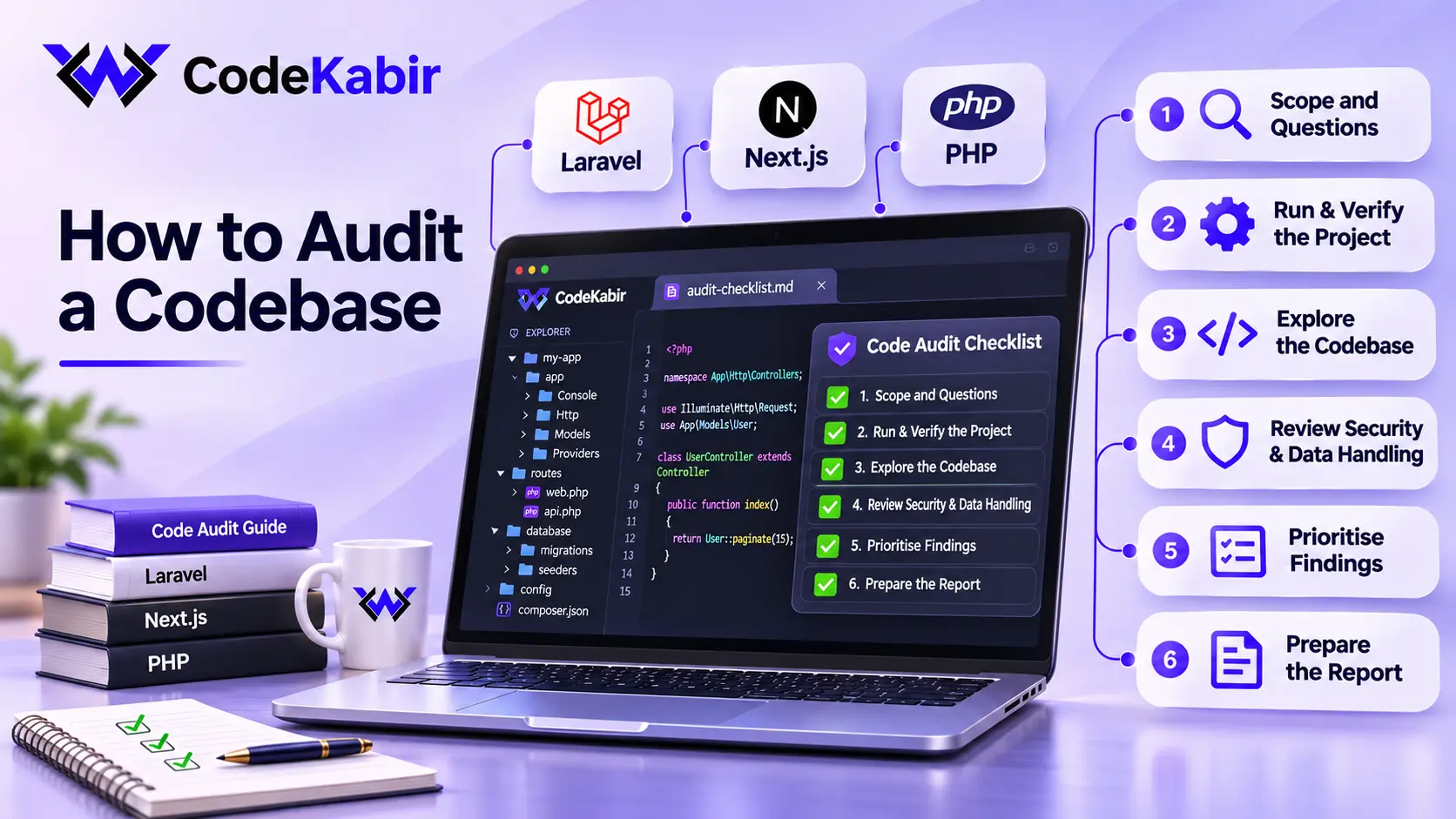
A code audit is an independent, structured review of an existing codebase and of how it is built, configured and deployed. It establishes the current state of the application, explains each risk in terms of what it could cost, and ends with prioritised recommendations. The work follows a fixed order: agree what the audit is for, get the application running, map it, check dependencies and framework support, examine authorization, validation, secrets and data handling, review tests and deployment, then rank the findings and write them up.
Code audit vs code review vs security audit vs penetration test
The terms are used loosely, which leads to mismatched expectations. They differ in the question they answer and in what they examine.
| Question | Looks at | Usually done by | |
|---|---|---|---|
| Code audit | What state is this codebase in, and what should be done first? | The whole application or an agreed part: code, dependencies, data, tests, deployment | A senior developer who did not write the code |
| Code review | Is this change ready to merge? | One pull request or set of changes | A teammate, as part of normal development |
| Security audit | Does the system meet a defined set of security requirements? | Security controls, often against a standard, sometimes infrastructure and processes too | Security specialists |
| Penetration test | Can an attacker exploit the running system? | A deployed environment, attacked with permission | Specialist testers, under an agreed scope |
A code audit includes security-related checks, and many of them overlap with the requirements in the OWASP Application Security Verification Standard, whose current stable release is 5.0.0. It is still not a security certification or a penetration test, and the report should say so.
Questions to ask before you open the code
A few questions save days of reading in the wrong place. Ask the owner, and write the answers down: they become the scope section of the report.
- What decision depends on this audit? Buying the business, fixing versus rebuilding, a launch, an upgrade, or choosing a developer.
- What is in scope, and what is not? The whole application, one module, the API only? Infrastructure and third-party services are often out of scope; say so explicitly.
- Which flows matter most? The ones that take money, hold personal or sensitive data, or would stop the business if they broke.
- Who controls what? The repository, hosting, domain, database, email and payment accounts. A codebase nobody can deploy is a finding in itself.
- What has gone wrong recently? Incidents, recurring bugs, slow pages, failed deployments. They tell you where to look first.
- What exists besides the code? Documentation, a staging environment, tests, a deployment procedure, monitoring.
- Who wrote it, and how? A team, one freelancer, an agency, or largely AI tools. Each leaves different patterns behind.
Get the application running before you judge it
An application that a newcomer cannot install and build from its repository is already telling you something. Reproducing the setup also shows which secrets, services and data it silently depends on.
Laravel
# Install exactly the versions recorded in composer.lock
composer install

# Framework and PHP versions, environment, drivers and cache state
php artisan about

# Read one area of configuration instead of opening every file
php artisan config:show app
php artisan config:show database

# Which migrations have run, and which are still pending
php artisan migrate:status
If there is no composer.lock in the repository, write that down: every install resolves fresh versions, and nobody can say which versions run in production. The debug value shown by config:show app must be false in production. Laravel's own configuration reads it from APP_DEBUG and defaults to false, so a true value was set deliberately somewhere.
Next.js
# Clean install from package-lock.json
# (fails if package.json and the lock disagree)
npm ci

# Production build, usually "next build": type and build errors surface here
npm run build
Check the Node.js version against the framework's requirement: Next.js 16 declares node >=20.9.0 in its package metadata. Then compare .env.example with the variables the code actually reads. A variable that only exists on the production server is a deployment risk, and if the only working copy of the application is the production server, that is the first finding of the audit.
Map an unfamiliar codebase
Read from the entry points inward, not file by file. Requests, scheduled tasks and queued jobs are where behaviour starts; the files they reach are the ones that matter.
Laravel: routes, models, data and schedules
# Every route with its middleware, excluding routes registered by packages
php artisan route:list -v --except-vendor

# A model's attributes, relations and observers (Invoice is an example name)
php artisan model:show Invoice

# The database at a glance, then the columns and indexes of one table
php artisan db:show
php artisan db:table invoices

# Work that runs without anyone clicking anything
php artisan schedule:list
The middleware shown by route:list -v is the quickest overview of protection. Routes that change data but carry only auth, with no can: middleware, are the first candidates for an authorization check inside the controller.
Next.js: Server Functions, route handlers and the proxy
In the App Router, folders define routes, route.ts files are HTTP endpoints, and functions marked 'use server' are Server Functions, also called Server Actions. The Next.js data security guide is explicit that an exported Server Action is reachable via a direct POST request, not just through the interface, so each one is an entry point to review. In Next.js 16 the middleware file convention is deprecated and renamed proxy.
# Server Functions: each exported one is reachable by a direct POST request
grep -rln --include='*.ts' --include='*.tsx' \
  --include='*.js' --include='*.jsx' "use server" app src

# Route handlers: HTTP endpoints
find app src -name 'route.ts' -o -name 'route.js'

# Request interception: proxy.ts in Next.js 16, middleware.ts before it
find . -maxdepth 2 \( -name 'proxy.*' -o -name 'middleware.*' \) \
  -not -path './node_modules/*'
Git history
The history shows where risk concentrates and whether knowledge sits with a single person.
# Files changed most often in the last 12 months
git log --since="12 months ago" --name-only --format="" \
  | grep -v '^$' | sort | uniq -c | sort -rn | head -20

# Commits per author, excluding merges
git shortlog -sn --no-merges

# A secret removed from the code is still in the history
# (STRIPE_SECRET is an example search string)
git log -S "STRIPE_SECRET" --oneline
Files that change often and have no tests are where regressions come from. A secret found in the history has to be treated as exposed and rotated, even if the current code no longer contains it.
Dependencies and framework support
There are two separate questions: do the installed packages have published vulnerabilities, and do the framework and runtime versions still receive security fixes?
# PHP: security advisories, abandoned packages and other policy matches
composer audit

# PHP packages with newer versions available
composer outdated

# JavaScript: exits with code 0 only when no vulnerabilities are found
npm audit

# The same audit, for production dependencies only
npm audit --omit=dev

# JavaScript packages with newer versions available
npm outdated
A reported advisory is a starting point, not a verdict. Check whether the vulnerable code path is actually used, and whether the fix requires a major upgrade. Composer's audit command also flags abandoned packages and packages reported as malware, and the npm audit documentation explains how --audit-level changes the failure threshold when you run it in a pipeline.
| Version | Status on 18 November 2026 |
|---|---|
| Laravel 10 | Security fixes ended on 4 February 2025 |
| Laravel 11 | Security fixes ended on 12 March 2026 |
| Laravel 12 | Security fixes until 24 February 2027 |
| Laravel 13 | Released 17 March 2026; security fixes until 17 March 2028 |
| Next.js 14 | Unsupported |
| Next.js 15 | Maintenance LTS; security releases through 31 January 2027 |
| Next.js 16 | Active LTS, the current major version |
| PHP 8.2 | Security fixes until 31 December 2026 |
| PHP 8.3 | Security fixes until 31 December 2027 |
| PHP 8.4 | Active support until 31 December 2026; security fixes until 31 December 2028 |
| PHP 8.5 | Active support until 31 December 2027; security fixes until 31 December 2029 |
Sources: the Laravel release notes, the Next.js support policy and PHP's supported versions page. These dates move, so check them on the day you audit. An upgrade is usually a project in its own right; the pages on Laravel upgrades and Next.js upgrades describe how that work is approached.
Authentication and authorization
Authentication, meaning who is signed in, is usually present. Authorization, meaning whether this user may see or change this particular record, is the check most easily missed, because the application looks correct to every user who only ever opens their own data.
Laravel: authorize the record, not only the route
public function update(UpdateInvoiceRequest $request, Invoice $invoice)
{
    // Any signed-in user can update any invoice by changing the ID.
    $invoice->update($request->validated());

    return redirect()->route('invoices.show', $invoice);
}// app/Policies/InvoicePolicy.php
public function update(User $user, Invoice $invoice): bool
{
return $user->id === $invoice->user_id;
}
// app/Http/Controllers/InvoiceController.php
use Illuminate\Support\Facades\Gate;
// ...
public function update(UpdateInvoiceRequest $request, Invoice $invoice)
{
Gate::authorize('update', $invoice);
$invoice->update($request->validated());
return redirect()->route('invoices.show', $invoice);
}The same policy can be enforced on the route with ->can('update', 'invoice'). What matters in the audit is that every action reading or changing a record someone else could own has one of these checks, and that a test proves a second user is refused.
Next.js: check inside every Server Function
The Next.js documentation recommends verifying authentication and authorization inside each Server Function rather than relying on the proxy alone. There is history behind that advice: in 2025, CVE-2025-29927 allowed middleware to be bypassed in affected versions, so applications whose only check lived there were exposed. The pattern from the Next.js authentication guide is a data access layer that verifies the session, called from every Server Function, which then checks ownership of the specific record.
// app/lib/dal.ts
import 'server-only'
import { cache } from 'react'
import { cookies } from 'next/headers'
import { redirect } from 'next/navigation'
import { decrypt } from '@/app/lib/session'

export const verifySession = cache(async () => {
  const cookie = (await cookies()).get('session')?.value
  const session = await decrypt(cookie)

  if (!session?.userId) {
    redirect('/login')
  }

  return { userId: session.userId }
})// app/invoices/actions.ts
'use server'
import { verifySession } from '@/app/lib/dal'
// findInvoice and removeInvoice stand for your own data functions
import { findInvoice, removeInvoice } from '@/app/lib/invoices'
export async function deleteInvoice(invoiceId: string) {
const { userId } = await verifySession()
const invoice = await findInvoice(invoiceId)
// Signed in is not enough: this user must own this invoice.
if (!invoice || invoice.ownerId !== userId) {
throw new Error('Invoice not found')
}
await removeInvoice(invoiceId)
}Server-side validation, secrets and data handling
Validation belongs on the server
Validation in the browser improves the form; it protects nothing, because a request can be sent without the form. In Laravel, the safe pattern is to write only validated fields to the model.
// Before: with an unguarded model, every field in the request is written,
// including fields the form never showed (is_admin, account_id, ...)
$user->update($request->all());

// After: only fields that passed validation reach the model
$validated = $request->validate([
    'name' => ['required', 'string', 'max:255'],
    'email' => ['required', 'email', 'max:255'],
]);

$user->update($validated);
Mass assignment protection only works if the model declares what may be filled. In Laravel 13 that is the #[Fillable([...])] attribute; Laravel 12 and earlier use the $fillable property. A model marked #[Unguarded], or with $guarded = [] in older versions, accepts whatever it is given, so $request->all() next to such a model is a finding. During development, Model::preventSilentlyDiscardingAttributes() makes Laravel throw an exception instead of silently dropping attributes that are not fillable.
Secrets
Look for secrets in three places: the repository and its history, the code sent to the browser, and the logs.
# Environment files committed to the repository (.env.example is expected)
git ls-files | grep -E '(^|/)\.env'

# Next.js exposes every NEXT_PUBLIC_ variable to the browser:
# none of them may be a secret
grep -rhoE "NEXT_PUBLIC_[A-Z0-9_]+" app src lib | sort -u
In Next.js, modules that hold secrets or query the database can import the server-only package, which stops them from being used in client code. In Laravel, check that error reports and logs do not record tokens, passwords or full request payloads.
Data handling
- Personal data. Which tables hold it, who can export it, and whether it appears in logs or error reports.
- File uploads. Type and size validated on the server, stored outside the public directory unless they are meant to be public, and never served from a path the user supplied.
- Queries. Raw SQL built from request input, through DB::raw() or whereRaw() for example, without bindings.
- Third-party services. Keys with more permissions than the feature needs, and webhooks accepted without verifying their signature.
Database, migrations and backups
Data outlives code, so mistakes here are the expensive ones.
- Migration history. migrate:status should match production. Migrations edited after they ran, or schema changes made by hand, mean the code no longer describes the database.
- Pending changes. php artisan migrate --pretend prints the SQL that pending migrations would run, without running it. Destructive changes need a rollback plan.
- Constraints and indexes. Foreign keys and unique constraints that exist only in application code, and growing tables without indexes on the columns used for filtering.
- Backups. When a restore was last tested, how long backups are kept and who can access them. A backup that has never been restored is an assumption.
- Copies of production data. In staging, on laptops or in shared exports, often with weaker protection than production.
Tests, CI, maintainability and deployment
Tests and continuous integration
# Laravel: runs the suite with Pest or PHPUnit, whichever the project uses
php artisan test

# Next.js: whatever the package.json scripts define, if they exist
npm test
npm run lint
Then read the tests that cover the critical flows. A suite that passes but never asserts on permissions, payments or data changes gives false comfort. Check whether a pipeline runs the tests and the build on every change, and whether anything stops a failing change from being deployed.
Maintainability
Combine the hotspot list from Git with static analysis: PHPStan, with the Larastan extension for Laravel, on the PHP side, and the TypeScript compiler and ESLint for Next.js. Then look for what tools measure poorly: business logic duplicated across controllers or components, dead code, and modules nobody dares to change.
Deployment
- How releases happen. A pipeline, a script or a manual upload, and whether the same steps run every time.
- Rollback. What happens when a release fails, and whether its migrations can be reversed.
- Background work. Queue workers and the scheduler running in production, and failed jobs being noticed by someone.
- Configuration parity. Differences between staging and production that would hide problems until release day.
Special considerations for AI-generated applications
Applications built largely with AI coding tools or app builders tend to fail in recognisable ways. The code is often fluent and consistent within a single file, while the checks that span the whole application are missing: authorization on every record, validation on the server, secrets kept out of the browser.
The OWASP Secure Coding with AI cheat sheet lists risks specific to AI-assisted development, including hallucinated dependencies, outdated dependencies with known CVEs, and tests that were fabricated or deleted. Each maps to a step above: confirm that every package exists and is maintained, run the dependency audits, and read the tests rather than trusting that they pass.
A 2026 study of more than 300,000 AI-authored commits, Debt Behind the AI Boom, found that code smells made up 89.3% of the issues introduced, and that 22.7% of the issues it tracked were still present in the latest version of the repositories. If the application was built mainly with AI tools and already needs repairing, fixing and stabilising AI-generated applications covers the review and the fixes together, and what drives the cost of fixing a vibe-coded app explains how that work is scoped.
What automated tools can and cannot establish
| Question | Tools can establish | Still needs a person |
|---|---|---|
| Known vulnerable packages | composer audit and npm audit report published advisories for the installed versions | Whether the vulnerable code is used, and how urgent the upgrade is |
| Type errors and some bug patterns | The TypeScript compiler, PHPStan and linters flag them consistently | Whether the code does what the business needs |
| Authorization | Very little: a tool cannot know which user should see which record | Reading each action against the business rules, and testing with two accounts |
| Secrets | Pattern scanners find likely keys in files and history | Whether a key is live, what it unlocks, and rotating it |
| Test quality | Coverage tools measure which lines run | Whether the tests assert the behaviour that matters |
| Architecture | Complexity and duplication metrics | Whether the structure fits where the product is going |
A clean scan is not a clean audit. Tools are fast and consistent at what they know; the audit's value lies in the questions they cannot answer.
Prioritise findings by severity and business impact
Severity measures how bad a finding is; business impact measures how much it matters to this owner's plans. A moderate finding can block a launch, and a serious one can sit in a module that is being replaced next month. Use an explicit scale and apply it consistently.
| Severity | Meaning | Illustrative example |
|---|---|---|
| Critical | Exploitable now, or likely to cause data loss or a serious outage | Any signed-in user can read or change other customers' records by changing an ID |
| High | Serious risk under realistic conditions, or blocks the owner's next step | The framework version no longer receives security fixes |
| Medium | Raises the cost and risk of every change | Pricing logic duplicated in three places with small differences |
| Low | Hygiene, worth fixing when the code is touched anyway | Outdated development-only dependencies |
Then order the work: critical findings first, then whatever blocks the decision the audit was commissioned for, then the cheap fixes that remove a lot of risk. Give every finding a rough effort so the owner can weigh it.
Write a report someone can act on
The report has two readers: the person who decides and the developer who will do the work. Write the summary for the first and the findings for the second.
- Summary. The overall state in plain language, and the answer to the question the audit was for.
- Scope and method. What was inspected, how, and what was not. Stating the omissions protects both sides.
- Findings. One per issue, each with location, evidence, risk, recommendation and effort.
- Dependencies and support. The versions found and their support status, with the date it was checked.
- Priorities and next steps. The order of work, tied to the owner's plans.
F-03 · Critical · Authorization
Where:      InvoiceController::update() and destroy()
Evidence:   No policy or Gate check; route:list -v shows only the auth
            middleware on both routes.
Risk:       Any signed-in user can change or delete another customer's
            invoice by changing the ID.
Recommend:  Add an InvoicePolicy, call Gate::authorize() in both actions,
            add a test for each.
Effort:     Small
Code audit checklist
Use this as a working list. Skip whatever is out of scope, and record that you skipped it.
Before starting
- The decision the audit informs is written down
- Scope and exclusions are agreed
- The critical flows are identified
- Access to the repository and environments is confirmed
Running and mapping
- Dependencies install from the lock files
- The application builds and runs from the repository
- Environment variables are documented
- Routes, Server Functions, jobs and schedules are listed
- Change hotspots are identified from the Git history
Security-related checks
- Every record-level action checks authorization
- Validation happens on the server
- No unvalidated input is mass-assigned
- No secrets in the repository, its history or the browser bundle
- Debug mode is off in production
- Uploads and raw queries are handled safely
Dependencies, data and delivery
- composer audit and npm audit results are reviewed
- Framework, PHP and Node.js versions are supported
- Migrations match production, and destructive ones have a plan
- Backups exist and a restore has been tested
- Tests run and cover the critical flows
- Releases are repeatable and can be rolled back
Report
- Each finding has location, evidence, risk, recommendation and effort
- Findings are ranked by severity and business impact
- What was not checked is stated
Conclusion
A useful audit depends less on the number of findings than on the order of the work: understand what the audit is for, reproduce the application, map it, check what tools can check, read what they cannot, and rank everything against the owner's plans. Done that way, the report answers a decision instead of listing opinions.
Want an independent audit of your application?
CodeKabir audits Laravel, Next.js and PHP applications and delivers a written report with prioritised findings. The scope, the process and how the price is agreed are described on the code audit services page.
Request a Quote